Author’s Note
Enterprise data is complex. There are usually pipelines built over decades with brittle integration and unclear dependencies. A business user or executive needing access to data likely relied heavily on their IT counterparts to build curated views and dashboards for insights. Giving these end users access to raw data to circumvent this IT delivery bottleneck further created more pipelines with even more brittle dependencies. I have seen this across customers — customers with central analytics teams, business-aligned/dedicated analytics teams. Then there are different data stores: ODS, ODW, EDW, data marts, data mesh, each with its own pros/cons and contribution to the overall architecture.
With the advent of LLMs, the text-to-SQL option finally seemed like a solution to one of the complexities of an enterprise data store. I have been trying different approaches to figure out how to help my customers. This blog captures my last iteration of this work. This was done in early April 2026. The blog took a while to clean up, shape, and write.
The Problem: Enterprise Data Is Fundamentally Different
Every LLM vendor will show you a demo where someone types “show me revenue by region” and gets a perfect SQL query back. These demos use clean schemas with intuitive column names like orders.total_amount and customers.region. They score above 85% on benchmarks like Spider.
Enterprise data warehouses are nothing like this.
A life insurance company’s data warehouse has columns named pol_stat_cd, prem_mode_cd, uw_class_cd, and cvg_typ_cd. It has 13+ tables in a star schema with fact tables holding millions of rows. It has domain-specific business logic — “lapse rate” means the percentage of policies that terminated due to non-payment within a given period, and it requires a specific calculation joining policy and premium tables with date windowing.
The BEAVER benchmark from MIT found that off-the-shelf LLMs achieved close to 0% end-to-end execution accuracy on real enterprise data warehouse queries. Enterprise-realistic benchmarks like BIRD-Ent and Spider-Ent show state-of-the-art models achieving only 39.1% and 60.5% execution accuracy respectively — roughly half what they score on academic datasets.
The reasons are straightforward: public LLMs can’t train on enterprise schemas because they’re inaccessible. Enterprise tables are far more complex. Business questions require multi-table joins and domain-specific aggregations that public benchmarks don’t test.
18 Months of Iteration
I’ve been building text-to-SQL prototypes for customer engagements over the past 18 months. The evolution tracks closely with model capabilities:
Early attempts (2024–early 2025): Models struggled to generate syntactically correct SQL for complex schemas. Multi-table joins would produce invalid syntax, wrong column references, or completely hallucinated table names. The failure mode was obvious — the generated SQL wouldn’t even execute.
Mid-period (mid 2025): Newer models got syntax right consistently. But the queries were inefficient (full table scans on million-row fact tables), lacked domain knowledge (couldn’t distinguish “lapse rate” from “surrender rate”), and had no sense of the data’s semantics. A query would execute successfully but return meaningless results because it joined on the wrong keys or misinterpreted a coded column.
Current generation (Claude 4.6+, late 2025–2026): Two things changed simultaneously. The models got dramatically better at reasoning about schema structure, and agentic frameworks emerged that let you build multi-stage pipelines rather than relying on a single LLM call. This combination is what finally makes enterprise text-to-SQL viable.
The key insight: the approach matters more than the model. Swapping in a better model improves results incrementally. Wrapping even a mid-tier model in a proper multi-stage pipeline with domain context improves results dramatically.
The Architecture: A Multi-Stage Reasoning Pipeline
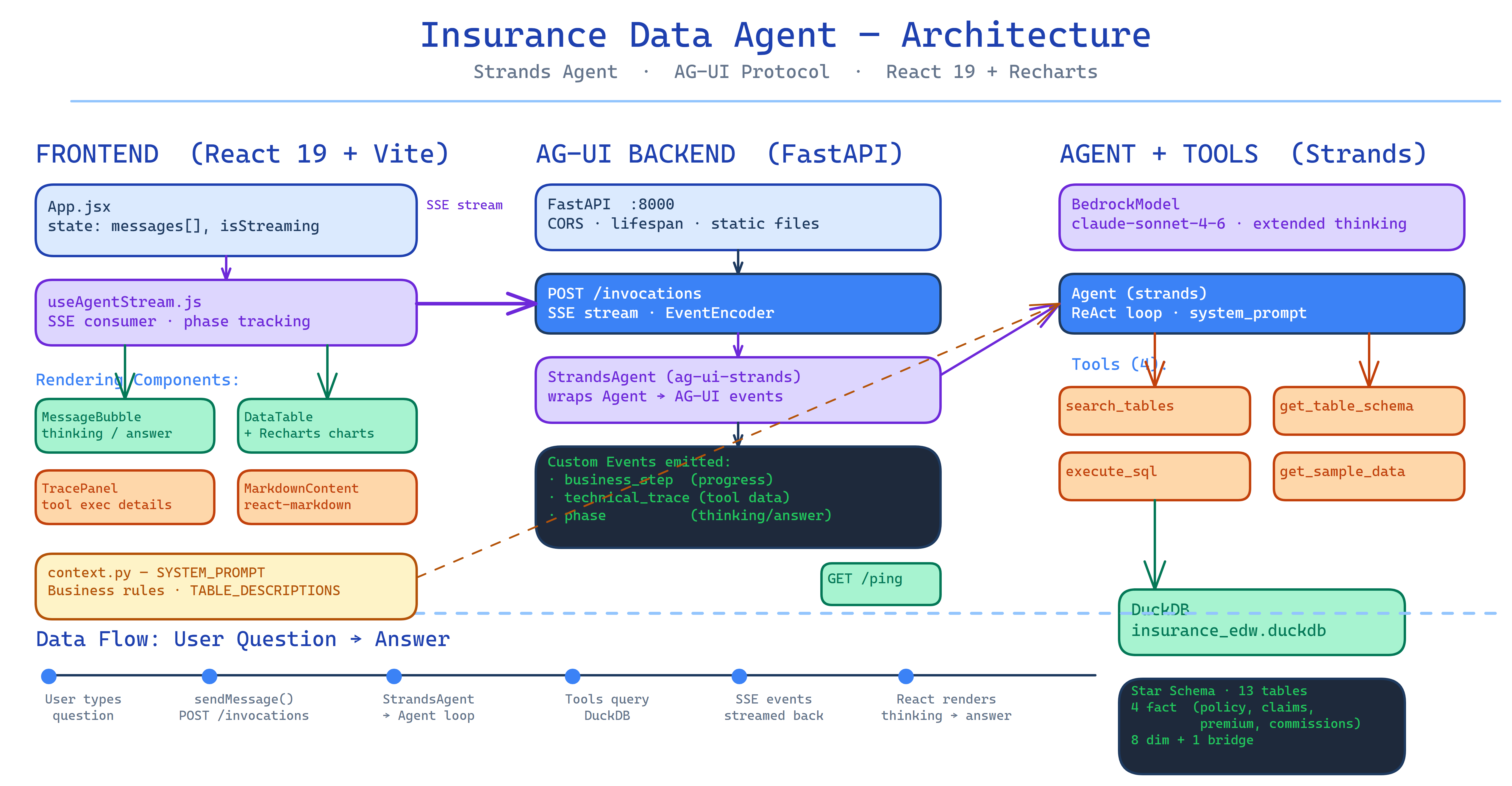
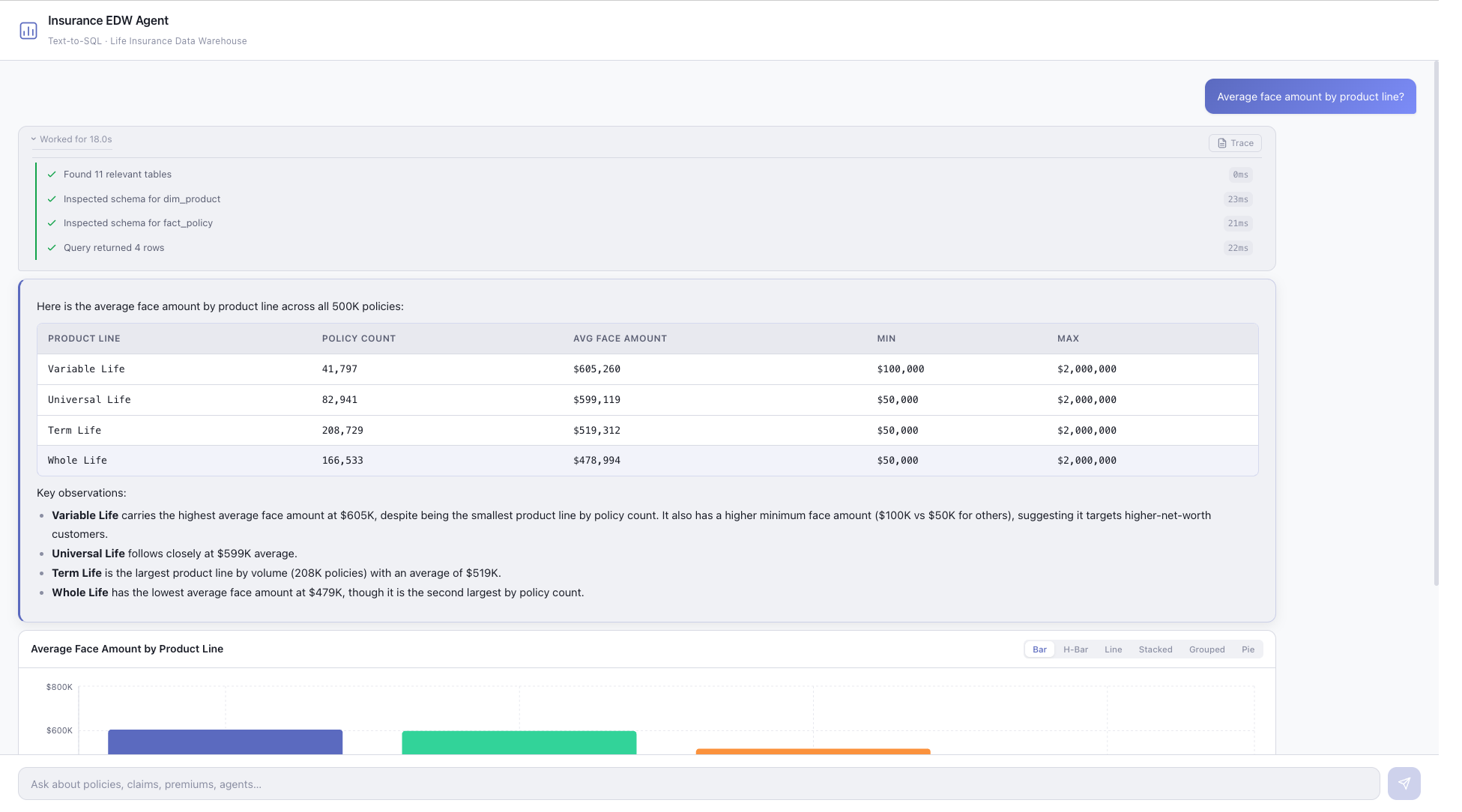
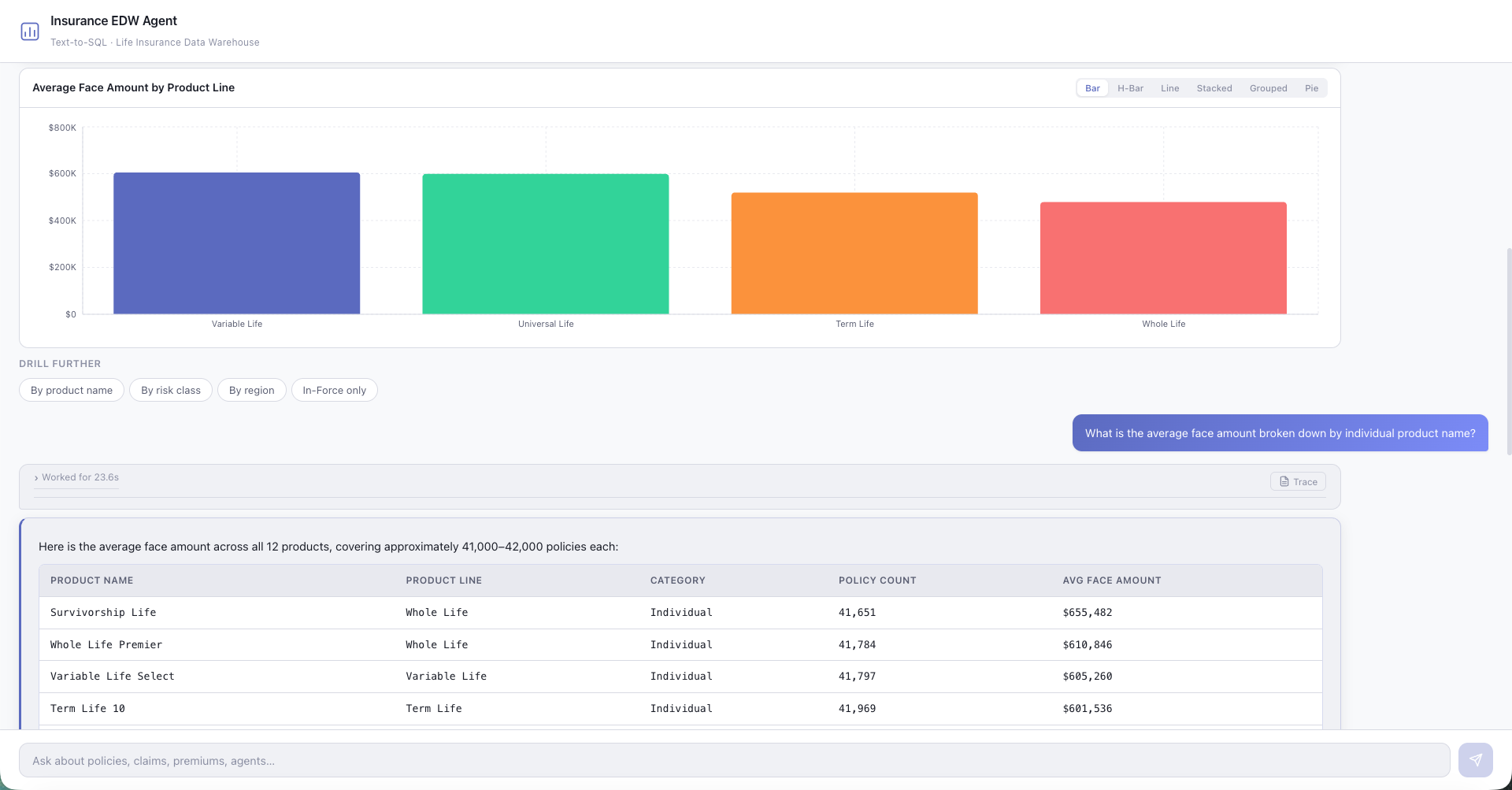
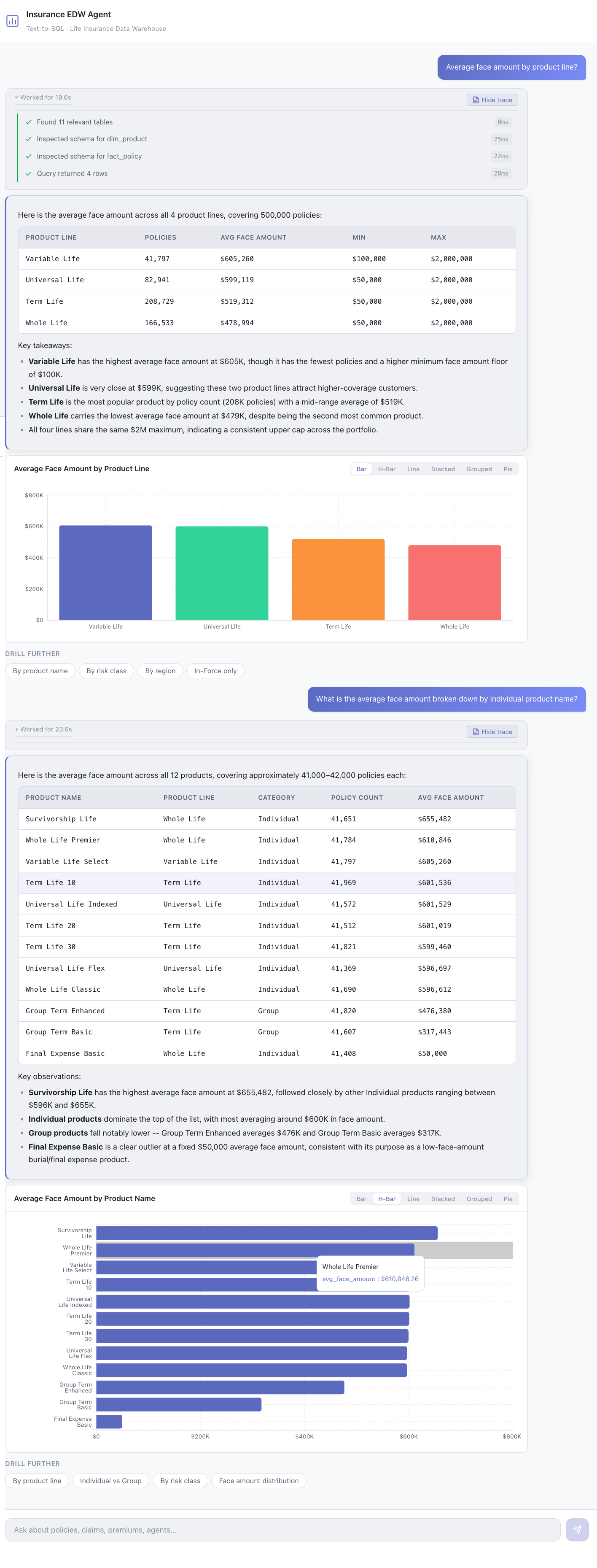
The agent I built uses Strands Agents with Amazon Bedrock (Claude), running against a local DuckDB analytical database. The pipeline has six stages, each with a specific job:
1. Intent Routing — Classify the question type. “Show me lapse rates by risk class” is an aggregation query. “What tables do we have?” is a metadata question. “Why did claim #4521 get denied?” requires a lookup with context. Different question types need different retrieval strategies.
2. Schema Retrieval — Search for relevant tables and columns. With 13 tables and hundreds of columns, you can’t pass the entire schema to the LLM — it degrades accuracy and blows context limits. Instead, the agent uses table descriptions and column annotations to retrieve only the relevant subset. This is where the semantic context layer does its work.
3. SQL Generation — Write the query with full domain context. The agent has access to business term mappings (“lapse rate” → specific calculation pattern, “persistency” → retention percentage at N months), valid values for coded columns (pol_stat_cd → “Active”, “Lapsed”, “Surrendered”), and known join paths between tables.
4. Validation & Execution — Run the query with guardrails. Check for dangerous keywords (DROP, DELETE, UPDATE), estimate cost via EXPLAIN, execute against the database, and verify the results look reasonable (not empty, not returning millions of unfiltered rows).
5. Self-Correction — If the query fails or returns suspicious results, the agent retries with the error message as context. This feedback loop improves accuracy by up to 20% according to research on SQLens and similar frameworks.
6. Answer & Visualize — Synthesize results into a human-readable answer with optional charts. Don’t just dump a result set — answer the original question.
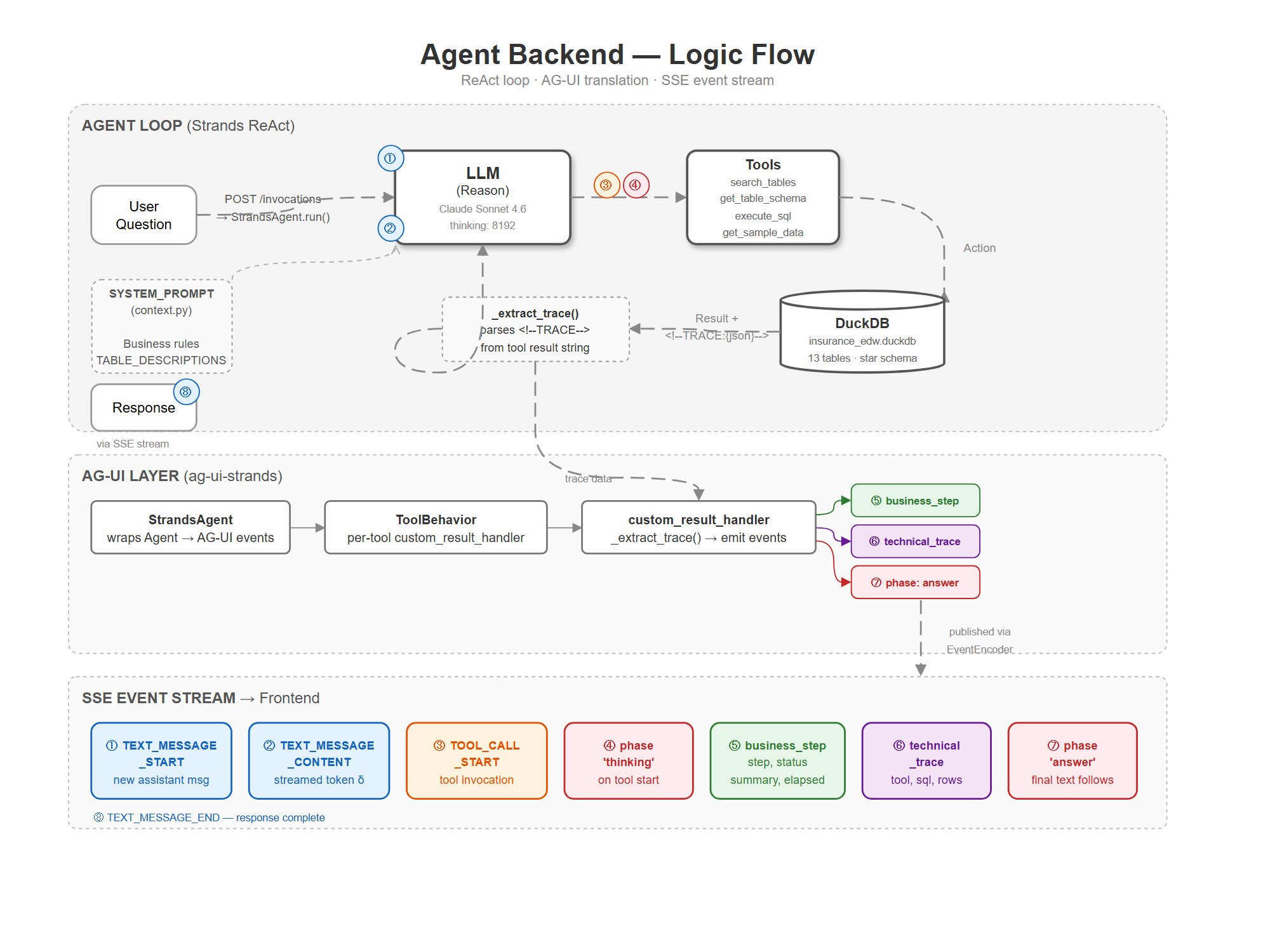
This isn’t a novel architecture — it follows the same pattern described in multiple production systems. What matters is that each stage is explicit and testable, not hidden inside a single prompt.
The Semantic Context Layer
The single highest-impact investment in the entire system is the semantic context layer. It’s what turns pol_stat_cd from an opaque column name into actionable context the LLM can reason about.
The layer provides three things:
Business term mappings. “Lapse rate” maps deterministically to a specific SQL pattern involving fact_policy joined to dim_status with a filter on termination reason. “Persistency” at 13 months means retention calculated from issue date. “In-force premium” excludes lapsed and surrendered policies. Without these mappings, the LLM has to guess — and it guesses wrong on domain-specific terminology.
Column annotations. Every cryptic column gets a description and its valid values. uw_class_cd is “Underwriting Risk Class” with values “Preferred”, “Standard”, “Substandard”. prem_mode_cd is “Premium Payment Frequency” — “Annual”, “Semi-Annual”, “Quarterly”, “Monthly”. These annotations are injected into the schema retrieval step so the LLM sees human-readable context alongside the raw DDL.
Join path definitions. The star schema has defined paths: fact_policy connects to dim_product via product_key, to dim_geography via geography_key, to dim_customer via customer_key. Making these explicit prevents the LLM from inventing joins that don’t exist or missing necessary joins that do.
Research from dbt Labs shows that semantic layer approaches achieve 98–100% accuracy for covered queries, compared to 84–90% for direct LLM-to-SQL generation. The tradeoff is coverage — you have to build the semantic layer for each domain — but for the queries that matter most to your business, it’s worth it.
A Realistic Test Harness
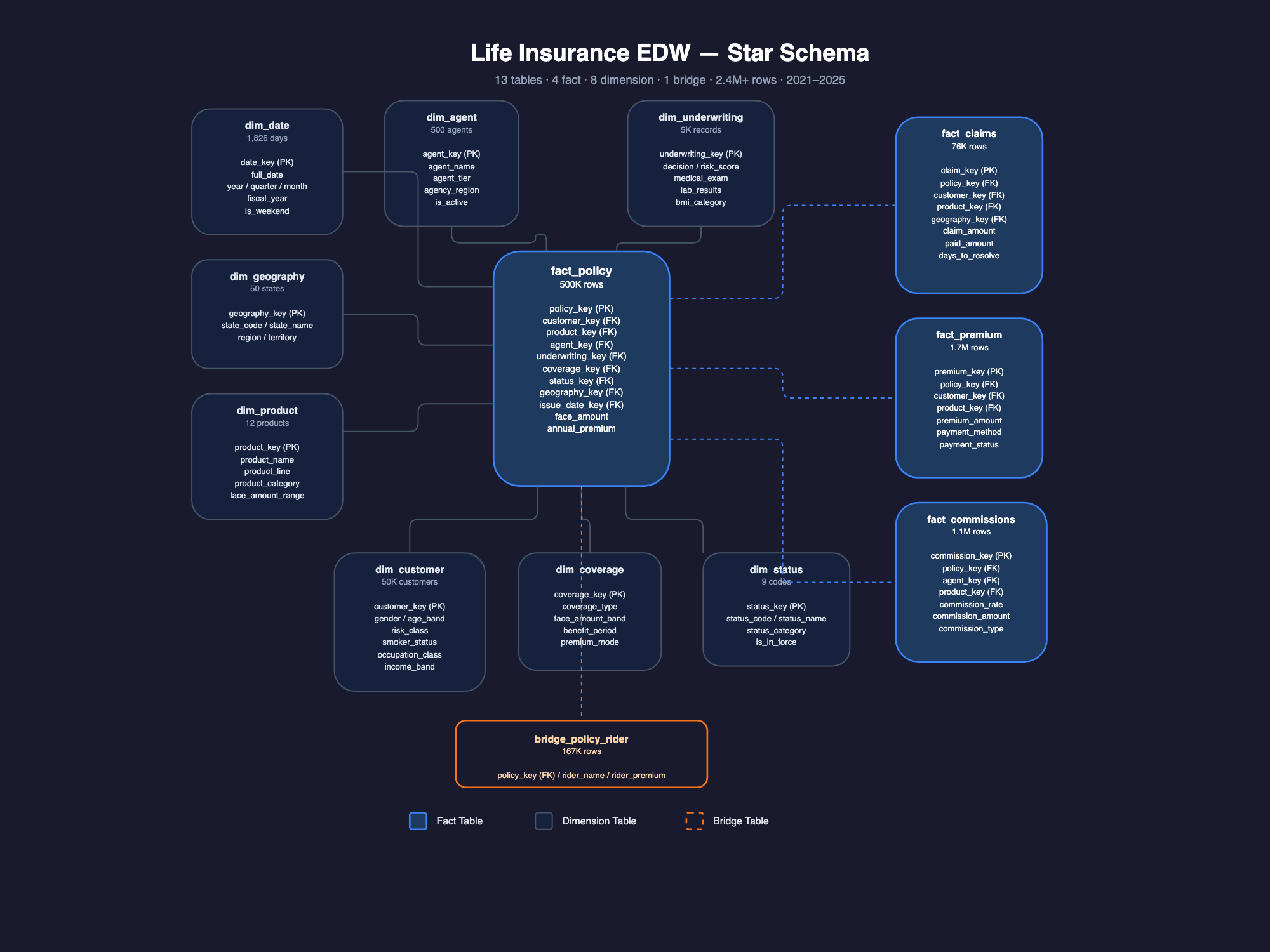
To validate the approach without using customer data, I built a synthetic life insurance data warehouse: 3.3 million rows across 13 tables in a star schema, covering 5 years (2021–2025) of synthetic but realistic data.
The synthetic data isn’t random — it has built-in correlations that mirror real insurance patterns:
- Population-weighted geography — CA, TX, FL, NY represent ~33% of the book
- Risk-driven premiums — 3x spread from best to worst risk profile
- Time trends — year-over-year growth, 2023 lapse spike, Q1/Q4 seasonality
- Agent tier effects — platinum agents write bigger policies with lower lapses
- Region-driven product mix — Northeast skews Universal/Variable, Southeast skews Term
These correlations mean the agent has to reason correctly to answer questions like “Why did lapse rates spike in 2023?” or “Which agent tier has the best persistency?” — questions where a naive query would return data but the wrong insight.
Security and Governance
For a regulated industry like life insurance, security isn’t optional:
Read-only access. The agent connects to a read-only database. This is the only guaranteed protection against a prompt injection or hallucination that generates a DROP TABLE or DELETE FROM. No amount of keyword blocking is sufficient on its own — read replicas are the floor.
SQL keyword blocking. Deterministic guardrails reject any generated SQL containing DDL or DML operations before execution. Belt and suspenders with the read-only connection.
PII redaction. Amazon Bedrock Guardrails provides configurable PII filtering. Insurance data contains Social Security numbers, protected health information, and financial details — redaction is embedded in the pipeline, not bolted on.
Full query audit trail. Every interaction is logged: the natural language input, the generated SQL, the execution plan, and the result set. This is both a debugging tool and a compliance requirement.
What’s Next
The demo runs against DuckDB locally. The schema and data generation are designed to be portable to Amazon Redshift — the repo includes Redshift DDL with DISTKEY/SORTKEY optimizations and COPY commands for loading from S3.
The agent framework (Strands Agents) is model-agnostic via Bedrock, so swapping models as newer ones release is a configuration change, not a rewrite. The pipeline architecture and semantic layer are the durable investments — they’ll outlast any individual model generation.
The full implementation — including the synthetic data generator, schema, agent tools, and web UI — is on GitHub: nikhilpenmetsa/insurance-data-agent.
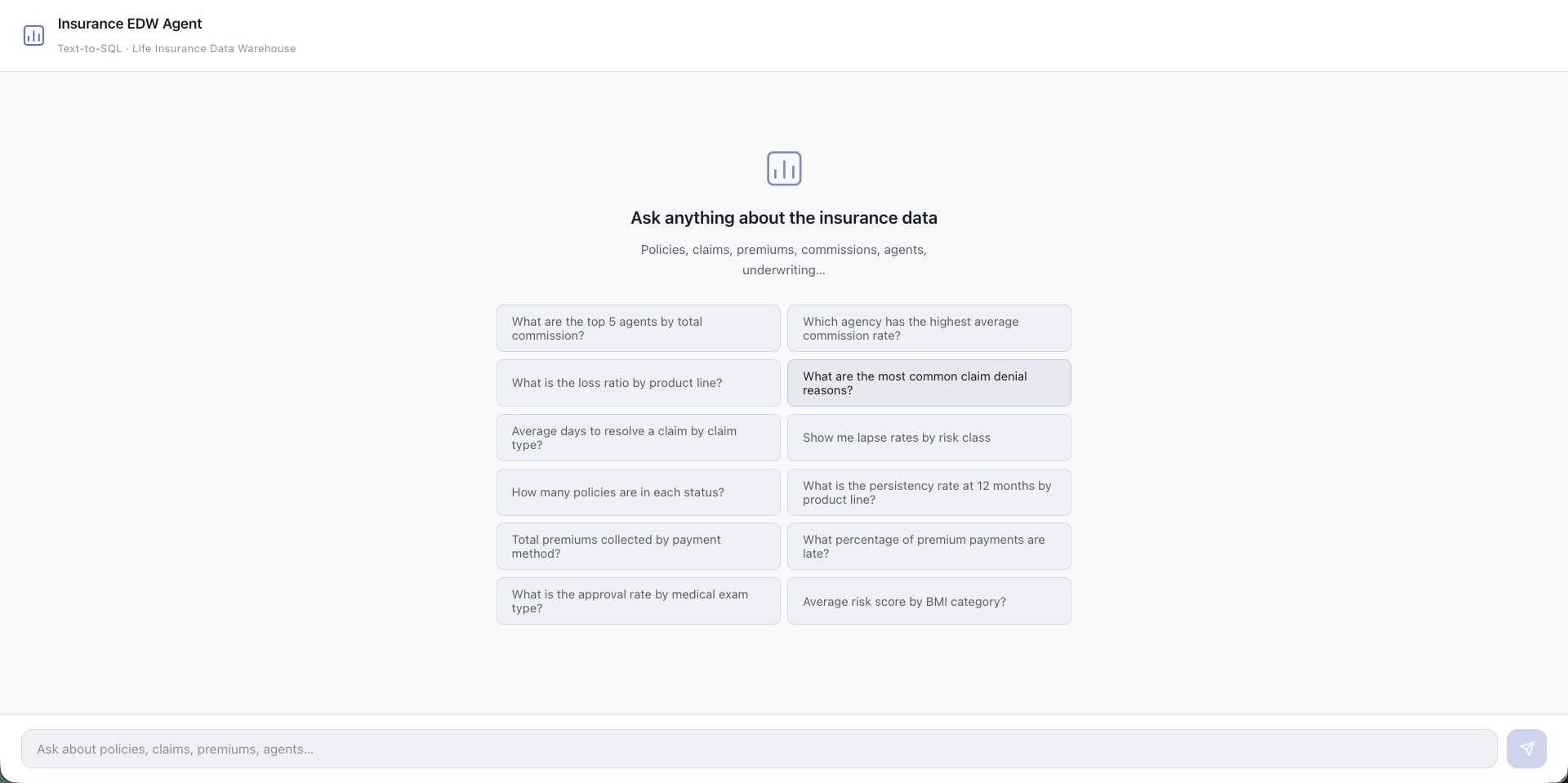
The Demo in Action
Reflections
I used this opportunity to try out the new AG-UI framework support in the Strands framework. I was tired of building custom plumbing for every AI demo (tiring even using skills). AG-UI in concept solves this, but I ended up hacking through the implementation. I want to revisit AG-UI for a later demo.
As I was building this demo, I was pleasantly surprised at how well Kiro was able to manage the context window compaction without losing too much detail. I could feel the underlying harness being able to spin up multiple agents/threads in the background to work on tangential things I asked.
My demo had 13 tables. In an enterprise environment, we are likely looking at at least a few hundred tables, multiple data sources, long-running queries, and other enterprise concerns. My demo purposefully chose a subset of the problem space. I hope the approach I shared is a valuable input for others trying to build it.
The demo was built with Kiro and this post was written with Claude Code. The direction, decisions, and debugging were mine — the assistants did the typing.