Enterprises deploying applications in private networks typically need their CI/CD compute to egress through a known, static IP — one that firewall teams can allowlist. GitHub-hosted runners can’t meet this: they use dynamic, shared IP ranges and don’t run inside your VPC.
AWS CodeBuild-hosted GitHub Actions runners placed in private subnets with an outbound route through a NAT Gateway solve this. All runner traffic exits through the NAT’s fixed Elastic IP — controlled, static, and auditable.
This post shows how to configure such a build project two ways: first using CodeConnections for github.com-hosted repositories, then using a PAT for GitHub Enterprise Cloud with data residency (the .ghe.com tier) where CodeConnections isn’t supported. There are subtle differences between the two paths that I discovered helping a customer with this deployment — I’m sharing them here.
Full source: codebuild-github-runner (CodeConnections) | codebuild-github-runner-pat (PAT/GHE)
| CodeConnections | PAT (GHE Data Residency) | |
|---|---|---|
| GitHub target | github.com | *.ghe.com (data residency) |
| Auth mechanism | GitHub App (OAuth) | Classic PAT in Secrets Manager |
| Credential slot | GITHUB | GITHUB_ENTERPRISE |
| Webhook creation | Automatic (CDK/CloudFormation) | Manual (--manual-creation + GitHub API) |
| VPC support | Yes | Yes |
| CDK source type | Source.gitHub() | Source.gitHubEnterprise() |
| Token rotation | Managed by AWS | Manual (rotate PAT in Secrets Manager) |
| Org-level webhook | Supported | Untested |
| Setup complexity | Low (one connection, CDK handles webhook) | Medium (3-phase deploy, manual webhook wiring) |
Part 1: CodeConnections (The Standard Path)
Demo Architecture
The implementation uses three AWS CDK stacks, each with a deliberately separate lifecycle:
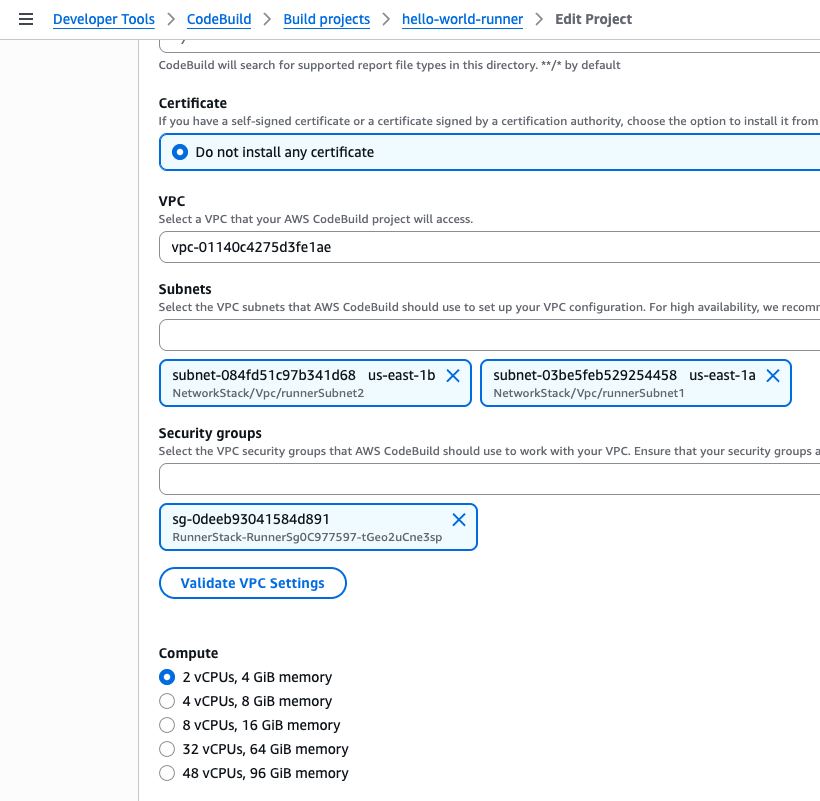
NetworkStack — creates the VPC with three subnet tiers: public (ALB + NAT), private-egress (where the runner lives), and private-isolated (where workloads run). A CfnEIP is explicitly allocated and pinned to the NAT Gateway. This is the IP you hand to the firewall team.
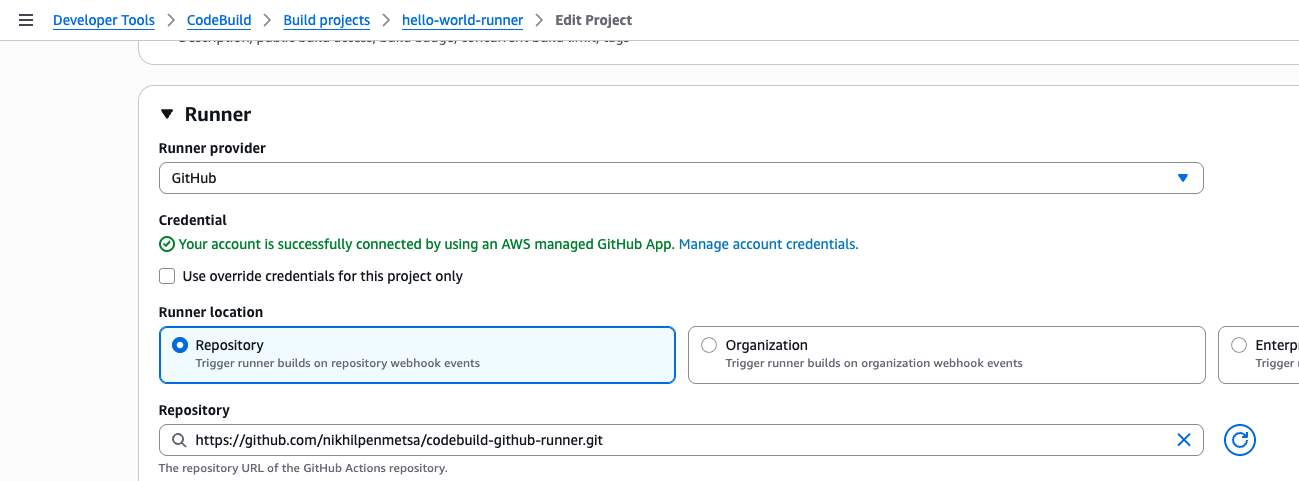
RunnerStack — a CodeBuild project placed in the private-egress subnets, configured as a self-hosted runner. A webhook filter (WORKFLOW_JOB_QUEUED) tells CodeBuild to spin up an ephemeral runner each time a GitHub Actions job is queued with the matching runner label. The runner is connected to GitHub via the AWS Connector for GitHub and scoped to the target repository:
The project is placed in the private-egress subnets — visible here in the VPC configuration:
HelloWorldStack — a sample workload deployed by the runner on every push to main. An ARM64 container on ECS Fargate in the isolated subnets, fronted by an ALB. This stack is intentionally separate from the runner — if the runner were defined inside the stack it deploys, you’d have a circular dependency.
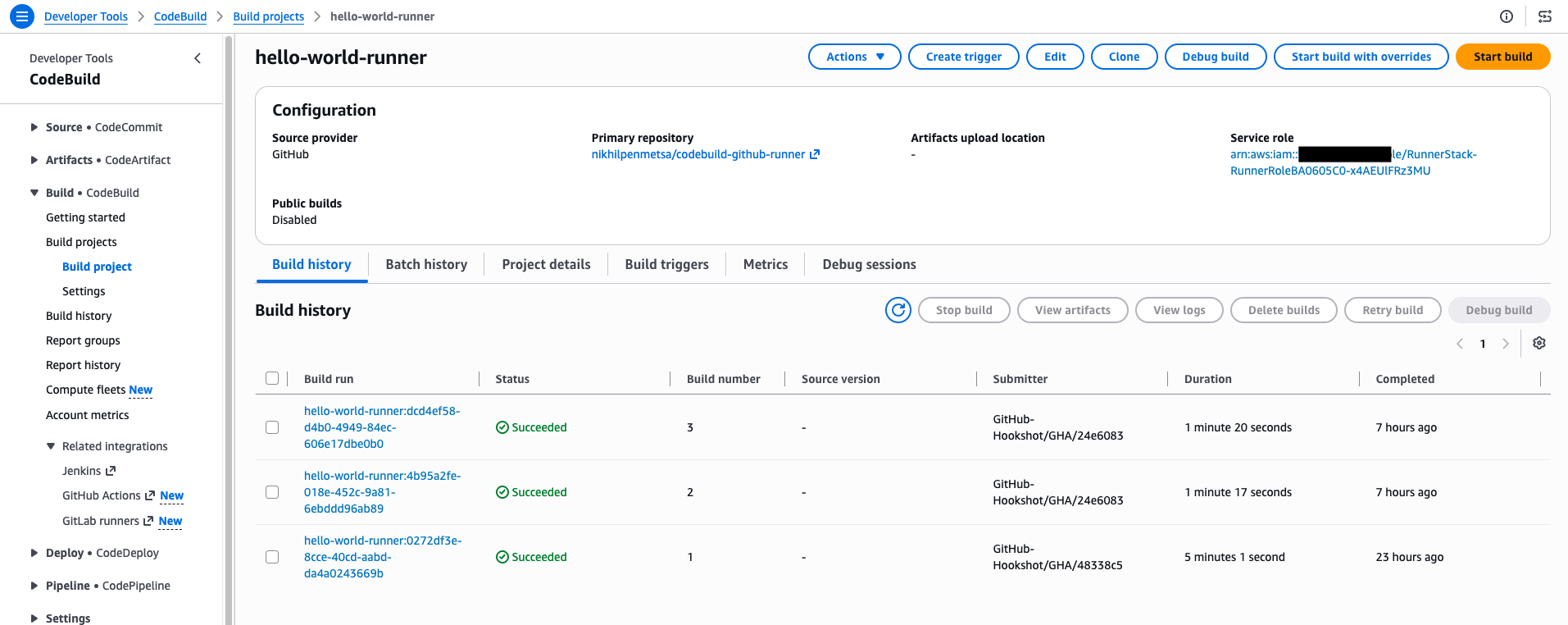
Each push to main triggers an ephemeral runner build. The CodeBuild build history shows the runner being invoked directly by GitHub (GitHub-Hookshot/GHA/...), completing in about 80 seconds:
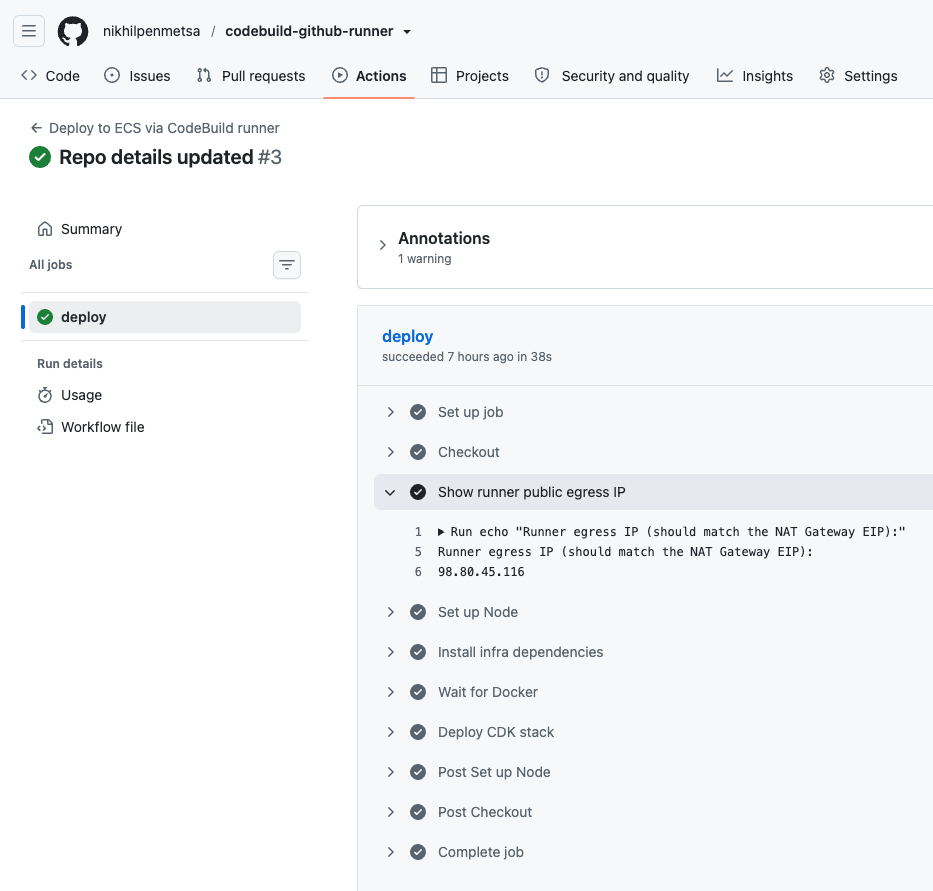
The GitHub Actions workflow includes a step that prints the runner’s public egress IP — 98.80.45.116, exactly matching the NAT Gateway’s EIP:
The Deployment Gotcha: IAM Policy Race Condition
When I first deployed the RunnerStack, it failed immediately with:
…/RunnerRole…/AWSCodeBuild-… is not authorized to perform
codeconnections:GetConnectionToken on resource …
My first instinct was that I had targeted the wrong role — maybe the CloudFormation execution role was being used instead of the runner’s service role. I checked the execution role (it had AdministratorAccess, so not the issue) and briefly considered whether an SCP was blocking the call.
CloudTrail settled it: the failing principal was RunnerRole — the right role. The permission was there, but it hadn’t attached yet.
Here’s what was happening: when you add a permission via role.addToPolicy(...), CDK emits it as a separate AWS::IAM::Policy resource. The CodeBuild project depends on the role (it references the role ARN) but has no dependency on that separate policy resource. So CloudFormation created the project — which synchronously calls CreateWebhook → GetConnectionToken to register itself with GitHub — before the policy was attached to the role.
The fix is to put that specific permission in inlinePolicies on the role constructor instead. Inline policies are embedded in the role resource itself, so the project’s implicit dependency on the role guarantees the permission is present before CreateWebhook runs.
const role = new iam.Role(this, 'RunnerRole', {
  assumedBy: new iam.ServicePrincipal('codebuild.amazonaws.com'),
  // Inline: must be attached before CreateWebhook fires at deploy time
  inlinePolicies: {
    Connection: new iam.PolicyDocument({
      statements: [new iam.PolicyStatement({
        actions: [
          'codeconnections:GetConnectionToken',
          'codeconnections:UseConnection',
        ],
        resources: [`arn:aws:codeconnections:${this.region}:${this.account}:connection/*`],
      })],
    }),
  },
});

// addToPolicy is fine here — only needed at job runtime, not during CreateWebhook
role.addToPolicy(new iam.PolicyStatement({
  actions: ['sts:AssumeRole'],
  resources: [`arn:aws:iam::${this.account}:role/cdk-hnb659fds-*`],
}));
The broader lesson: addToPolicy is not wrong in general. It only bites you for permissions that CloudFormation needs to resolve synchronously during resource creation — before a separate policy resource has time to attach. If you hit an unexpected not authorized on a CodeBuild project deploy, check CloudTrail to confirm which principal is actually failing before assuming it’s the wrong role.
Part 2: PAT Authentication (The GHE Data Residency Path)
The CodeConnections Gap
Everything in Part 1 uses AWS CodeConnections (formerly CodeStar Connections) to authenticate CodeBuild to GitHub. It’s the recommended path — a GitHub App handles OAuth, webhook creation, and repo cloning transparently.
But there’s a gap: AWS CodeConnections does not yet support GitHub Enterprise Cloud with data residency — the custom *.ghe.com domains that enterprises use when their GitHub data must stay in a specific geography. If your customer is on one of these domains, CodeConnections simply won’t work.
The workaround: use a Personal Access Token (PAT) with CodeBuild’s GITHUB_ENTERPRISE source credential type. This is the same mechanism you’d use for a self-hosted GitHub Enterprise Server — it just happens to work for GHE Cloud data residency domains too, since they share the same API structure (https://HOSTNAME/api/v3/...).
Setup: PAT, Credentials, and Manual Webhook
The flow involves creating resources in both AWS and GitHub:
- AWS Secrets Manager — store the PAT
- AWS CodeBuild — register the PAT as a
GITHUB_ENTERPRISEsource credential (this is a separate credential slot fromGITHUB/CodeConnections — they coexist) - AWS CodeBuild — create the project with
Source.gitHubEnterprise()pointing at the clone URL, placed in VPC private subnets - AWS CodeBuild — create a webhook on the project with
--manual-creation(returns a payload URL and secret) - GitHub — register that payload URL as a webhook on the repo, listening for
workflow_jobevents
Both credential slots existing side by side:
$ aws codebuild list-source-credentials --region us-east-1
{
    "sourceCredentialsInfos": [
        {
            "arn": "arn:aws:codebuild:us-east-1:XXXXXXXXXXXX:token/github",
            "serverType": "GITHUB",
            "authType": "CODECONNECTIONS",
            "resource": "arn:aws:codeconnections:us-east-1:XXXXXXXXXXXX:connection/XXXXXXXX-XXXX-XXXX-XXXX-XXXXXXXXXXXX"
        },
        {
            "arn": "arn:aws:codebuild:us-east-1:XXXXXXXXXXXX:token/github_enterprise",
            "serverType": "GITHUB_ENTERPRISE",
            "authType": "PERSONAL_ACCESS_TOKEN"
        }
    ]
}
At runtime, the flow is the same as Part 1: GitHub sends workflow_job.queued → CodeBuild payload URL → CodeBuild spins up an ephemeral runner in your VPC.
In CDK, the credential and project look like this:
const pat = secretsmanager.Secret.fromSecretNameV2(
  this, 'GitHubPat', 'codebuild/github-pat'
);

new codebuild.GitHubEnterpriseSourceCredentials(this, 'GheCredentials', {
  accessToken: pat.secretValue,
});

new codebuild.Project(this, 'RunnerProject', {
  projectName: 'hello-world-runner-pat',
  source: codebuild.Source.gitHubEnterprise({
    httpsCloneUrl: 'https://your-org.ghe.com/org/repo.git',
    webhook: false, // created manually — see below
  }),
  environment: {
    buildImage: codebuild.LinuxArmBuildImage.AMAZON_LINUX_2_STANDARD_3_0,
    computeType: codebuild.ComputeType.SMALL,
    privileged: true,
  },
  vpc,
  subnetSelection: { subnetType: ec2.SubnetType.PRIVATE_WITH_EGRESS },
});
The Webhook Auto-Creation Problem
CDK’s webhook: true tells CloudFormation to call CreateWebhook during resource creation — CodeBuild then uses the PAT to create a webhook on GitHub automatically. In theory this is seamless. In practice, I hit two independent failures:
With VPC: CloudFormation fails immediately with “Failed to create vpc connection for webhook”. The project, VPC config, and webhook are all in one CreateProject call — and something about establishing the VPC connection for the webhook doesn’t work.
Without VPC: CloudFormation fails with “GitHub webhook limit reached. Please delete a webhook from this repository” — even with zero existing webhooks on the repo. The error code is OAuthProviderException, suggesting the PAT-based auto-creation path has a bug or unsupported interaction when the GITHUB_ENTERPRISE source type targets a github.com URL.
I tested this systematically:
| VPC | Webhook auto (CDK) | Result |
|---|---|---|
| Yes | Yes | Failed — “Failed to create vpc connection for webhook” |
| No | Yes | Failed — “GitHub webhook limit reached” |
| Yes | No (manual) | Success |
The workaround: deploy the project with webhook: false, then create the webhook via CLI with --manual-creation. This gives you a payload URL and secret that you register on GitHub yourself. The deploy script automates all three steps.
Whether these failures also occur on real .ghe.com domains is unknown — I tested against github.com using the enterprise source type. On a real GHE domain, the auto-creation may work fine. But --manual-creation works regardless, so it’s the safer default.
Proof: The /api/v3/ Path
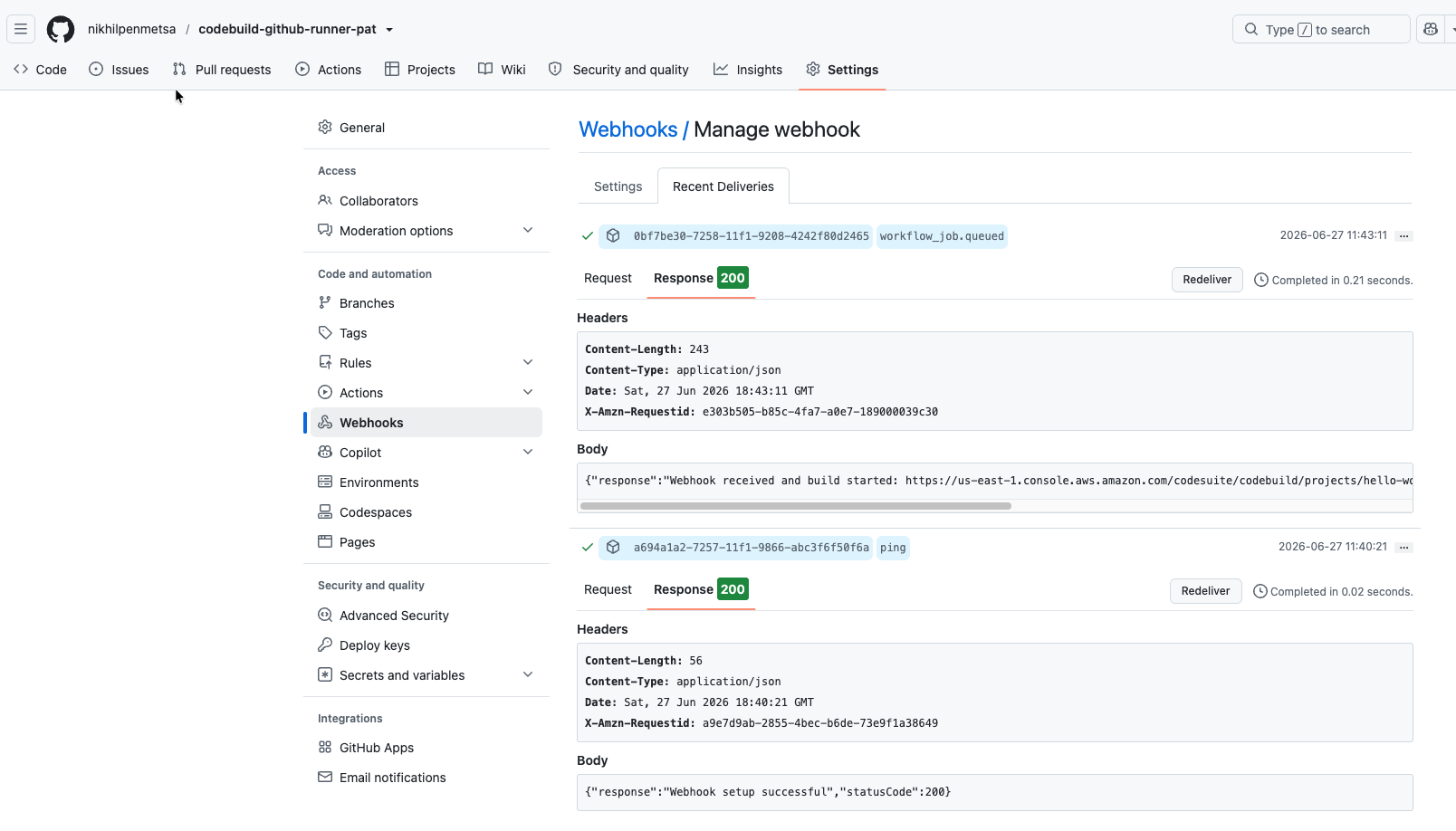
After deploying, I pushed a commit and observed:
- GitHub sent a
workflow_job.queuedwebhook delivery → CodeBuild responded 200 with “Webhook received and build started”:
- CodeBuild started a build and attempted runner registration:
[Container] 2026/06/27 16:52:14.474419 No runtime version selected in buildspec.
[Container] 2026/06/27 16:52:14.743923 Error while fetching runner token:
  error code 400: Runner token unavailable:
  POST https://github.com/api/v3/repos/nikhilpenmetsa/codebuild-github-runner-pat/actions/runners/registration-token: 422 []
[Container] 2026/06/27 16:52:14.743943 Phase complete: DOWNLOAD_SOURCE State: FAILED
The key line is the URL: https://github.com/api/v3/repos/.../actions/runners/registration-token. That /api/v3/ path on the hostname is the GitHub Enterprise Server REST API format. GitHub.com uses https://api.github.com/... instead, so registration fails with a 422 on my test repo. But on a real .ghe.com domain (e.g., https://acme.ghe.com/api/v3/repos/.../actions/runners/registration-token), this is the correct endpoint — runner registration would succeed.
Gotcha: CDK Removes the Webhook on Redeploy
If you deploy the CDK stack after the webhook exists (e.g., to update the VPC config), and your template has webhook: false, CloudFormation will remove the webhook from CodeBuild. The GitHub-side webhook remains, but deliveries start returning 400 (“Cannot find webhook with the ID specified”).
This is why the deploy script creates the webhook as the last step — after all CDK deploys are done. If you need to update the stack later, you’ll need to re-run the webhook creation steps afterward.
Adapting for a Real Environment
Both approaches:
- VPC: The demos create their own VPC. In a real environment, import the existing one using
ec2.Vpc.fromLookup()or an SSM Parameter. - Org-level scope: The demos connect one repo. An org-level GitHub App connection with a CodeBuild organization webhook covers all repos from a single runner project.
- Privileged mode: The runner uses
privileged: trueto support Docker-in-Docker for building container images. If the build doesn’t build images, you can drop it.
CodeConnections path:
- SCPs:
codeconnections:GetConnectionTokenis a common SCP blind spot — worth verifying it’s not blocked before spending time debugging elsewhere.
PAT/GHE path:
- Clone URL: Change
httpsCloneUrlto point at the GHE instance (e.g.,https://acme.ghe.com/org/repo.git) - PAT source: The PAT must be issued from that GHE instance, not github.com
- Webhook registration: The
gh apicall in the deploy script needs--hostname acme.ghe.com - Control Tower (CT.CODEBUILD.PR.1): This proactive control checks whether a CodeBuild source URL contains inline credentials. It only evaluates source types
GITHUBandBITBUCKET— ourGITHUB_ENTERPRISEsource type is skipped entirely. The PAT is stored in Secrets Manager and never appears in the URL, so we’re compliant with the spirit of the control. But be aware thatGITHUB_ENTERPRISEsidesteps the check — if your organization’s intent is to prevent all PAT-based auth (not just inline credentials), you’ll need additional guardrails.
The hard part is getting the webhook wired correctly; once that’s done, the runtime behavior is identical to the CodeConnections variant.
The demo was built with Kiro and this post was written with Claude Code. The direction, decisions, and debugging were mine — the assistants did the typing.